Real speed
Automatic decomposition of epics into atomic, parallelisable tasks. What would take weeks, the graph delivers in cycles.
Stigmergy · deliver software with the power of nature
They carry leaves. Leave pheromone trails. The entire system evolves on its own, no alignment meeting, no roadmap, no central orchestrator.
This is stigmergy: intelligence that emerges from the trail each agent leaves behind.
agf (agent-graph-flow) is an open-source CLI that orchestrates AI coding agents using stigmergy — each cycle deposits pheromone that biases the next, so the system improves without a central orchestrator. It runs locally: no Docker, no mandatory cloud.
local-first · no docker · 5 platforms
Apache-2.0 · open forever · auditable in any environment
The analogy
“We didn't build a tool that thinks for you. We built one that learns with you, cycle by cycle.”
What agf is
agent-graph-flow is a local-first CLI for AI agent orchestration. A text request becomes a persistent execution graph that runs an autonomous cycle with guardrails.
Mandatory TDD. One task at a time. Each call is measured in tokens, so the cost stays low and predictable.
v0.22.3 · release highlights
This version replicates the behavior of Atta: pheromone is used adaptively. Efficient trails are reinforced; inefficient ones evaporate naturally.
Δτ = Q/L. What worked cheaply and well becomes the most likely trail.
ρ = 0.10. Obsolete patterns disappear on their own, without lock-in.
30% tries new paths. The colony never gets stuck on the first local optimum.
And an identity guided by an honest principle: no humanwashing. agf doesn't think, doesn't feel, isn't "intelligent" in the human sense. It replicates an algorithm from nature and does exactly what it promises.
Automatic decomposition of epics into atomic, parallelisable tasks. What would take weeks, the graph delivers in cycles.
TDD built into the flow. Each cycle passes through Definition of Done. No task advances without evidence.
agf learns patterns from your history. The next project starts with the accumulated knowledge from all previous ones.
Local-first · one command
All output is a single-line minified JSON, made to be read by another AI. Each command prints its own cost in tokens.
Install once. Use offline. No external dependencies beyond the agent itself.
Install in seconds · single binary
One self-contained binary per OS — no Node, no npm, no Docker. Download and run.
Install with one command:
Install with one command:
Install with one command:
macOS: the binary is unsigned — the installer clears the quarantine attribute automatically. When downloading manually, verify the checksum (.sha256).
chmod +x agf-darwin-arm64chmod +x agf-linux-x64shasum -a 256 agf-darwin-arm64Compare the output with the .sha256 file from the release../agf --versionPrints version + token cost. Then try: ./agf shape "your first request"agf shape "build a REST API for todos"The 3 graphs — and only 3
Three skills cover the whole cycle: plan, build, harden. Each mirrors a master from nature.
graph-backlog-generationThe architect bird builds a meticulously planned mud nest before laying its first egg. The backlog graph does the same: it turns an idea into a PRD and a graph of atomic tasks with testable criteria — structure before a single line of code.
graph-builder-leafcutterThe colony cuts leaf by leaf, in line, never stopping, cultivating the fungus that feeds them all. The builder graph pulls task by task (WIP=1), implements with TDD (RED→GREEN→REFACTOR) and deposits what it learns — until the backlog is exhausted.
graph-woodpeckerThe woodpecker drums the trunk to find what is hollow and rotten inside. The woodpecker graph hunts bugs, vulnerabilities and debt, and proves every fix with a regression test — toward ≥80% coverage.
The visual dashboard
When you run the agf dashboard command, your browser opens a panel with two screens: the Graph (the map of the work) and the Economy (how much you saved). Here is every item explained simply — no jargon.
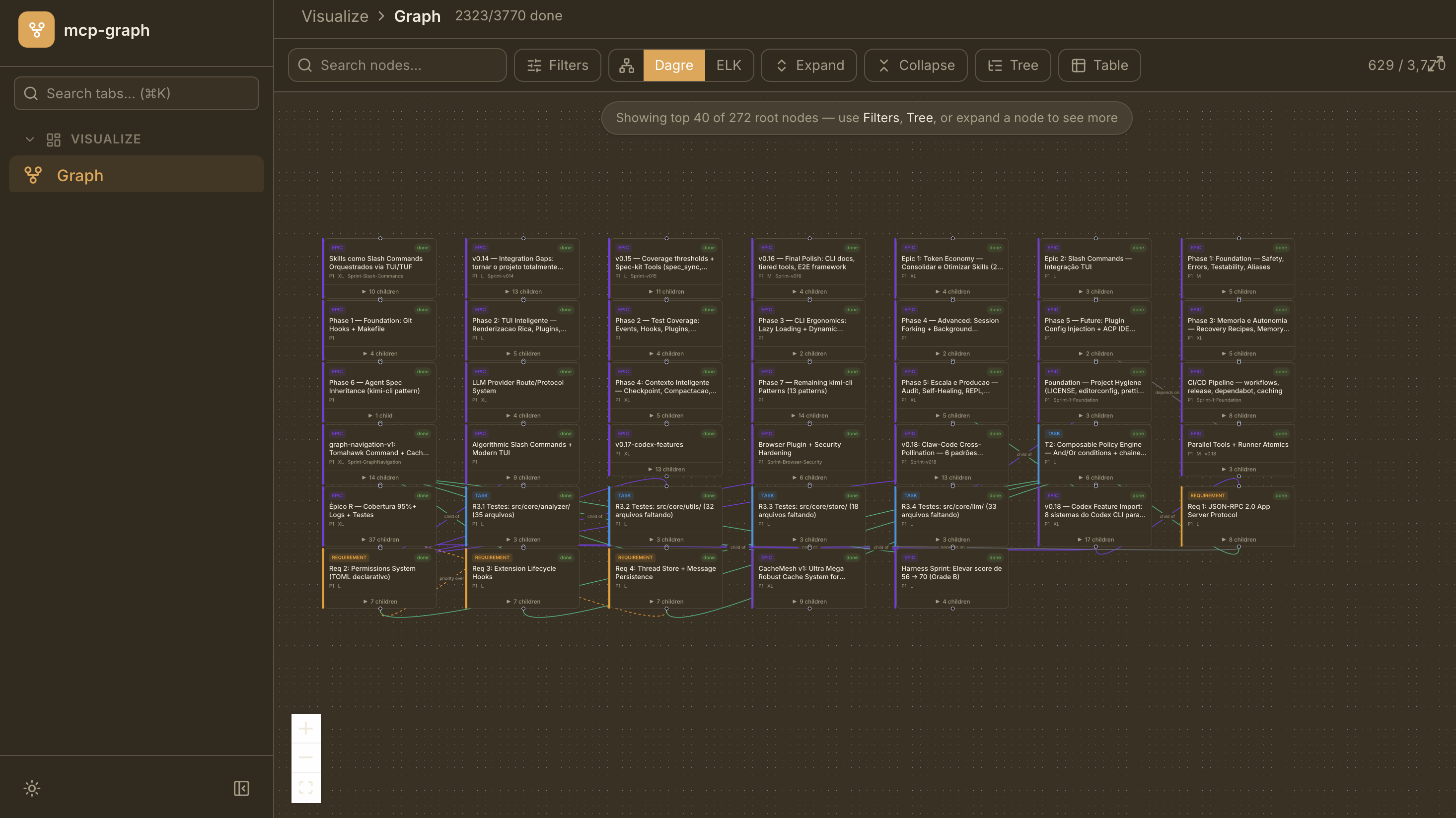
The map of everything the project has to do. Each little box is a unit of work; the lines show what depends on what.
At the top, progress in a single number: 2,323 of 3,770 tasks already finished. The fastest way to know 'how much is left'.
Type a word and the panel finds the task by name, with no need to scroll the whole map. Great for finding something instantly.
Shows only what matters — e.g. just what's in progress, only the bugs, or a single owner's work. Use it to focus and cut the noise.
Two ways to lay out the map automatically. If a layout looks cluttered, switch between them until it reads clearly — it's just a visual preference.
Opens or closes the details (the subtasks) of each box. Start everything collapsed to see the big picture, then open only what you're examining.
Swaps the visual map for a hierarchical list (Tree) or a spreadsheet (Table). For people who prefer reading a list over a diagram.
Each box is a unit of work. The colored tag tells the type: EPIC (a big goal), TASK (one task), or REQUIREMENT (a rule). The green 'done' badge means completed.
They show the links: what depends on what, and what is part of what. Following the lines is how you understand the order the work must happen in.
Zoom in, out, and recenter the map. Essential for navigating large projects without getting lost.
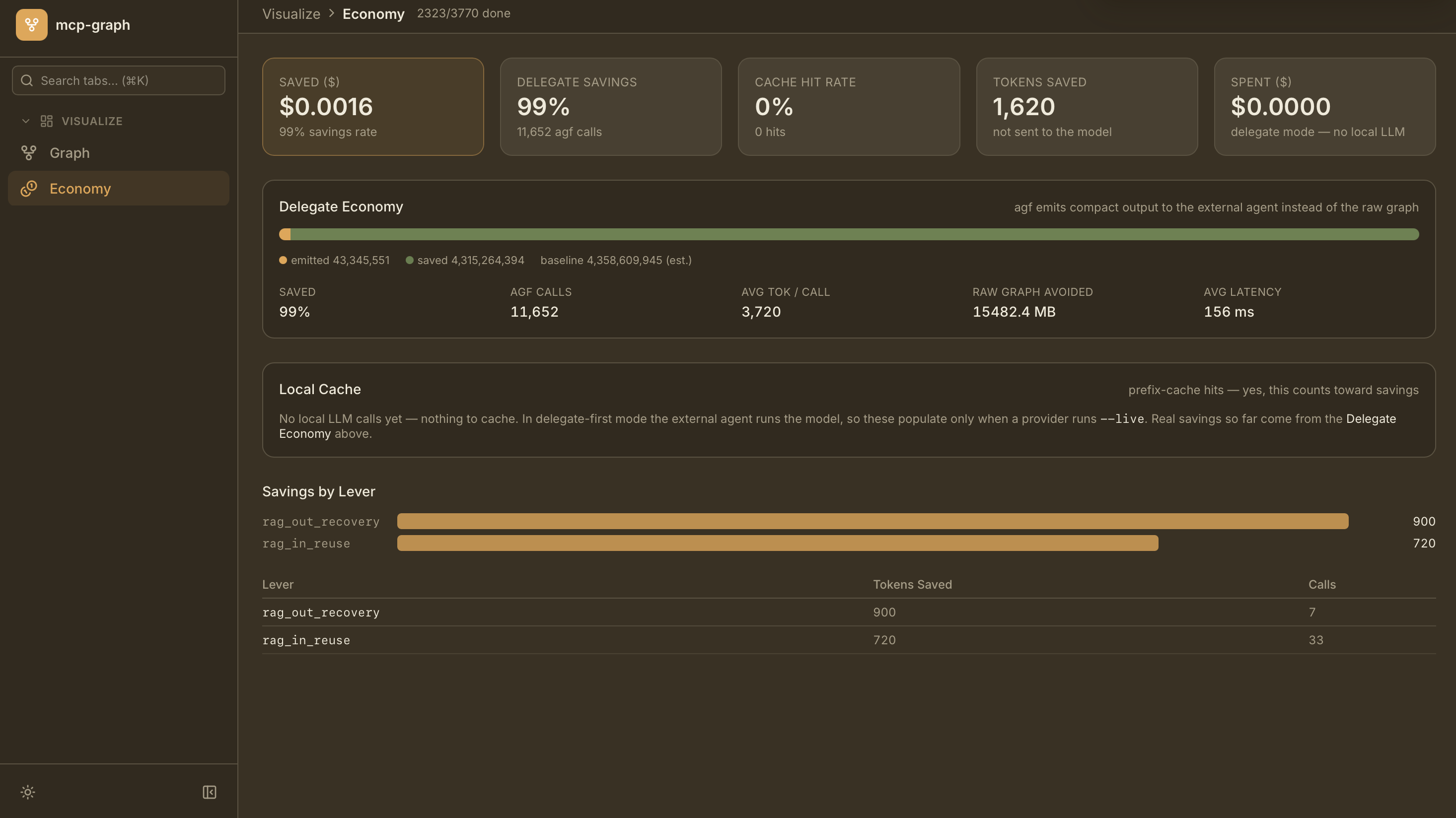
How much the agf saved you on AI cost. The core idea: send little text to the model, reuse whatever it can, and keep everything measured.
How much money you avoided spending on AI calls. '99% savings rate' means: for every $1 you'd normally spend, the agf avoided 99 cents.
The biggest saving comes from 'delegate mode': instead of sending the whole project to the AI, the agf sends only a lean summary. The number beside it (e.g. 11,652) is how many times that happened.
How many answers were reused from local memory instead of calling the AI again. 0% here is expected: in delegate mode it's your agent — not the agf — that calls the model.
Tokens are the little chunks of text the AI charges for. This number is the tokens that were NOT sent to the model — fewer tokens, smaller bill.
How much the agf spent directly on AI. Usually zero because, in delegate mode, it's your own agent that pays for the calls — the agf just organizes and saves.
Shows visually how much was sent (emitted) versus how much was saved, compared to sending the whole 'raw graph' (baseline). Almost the entire bar is savings. Below it: average savings, number of calls, average size sent, how much data was avoided, and the average response speed.
The local memory of answers. It only fills up when you use an AI provider with the --live option. That's why it shows empty in delegate mode — and the panel explains that right on screen, never leaving you in the dark.
The 'levers' are automatic reuse techniques that are switched on, and how much each one saved. In the example, rag_out_recovery saved 900 tokens across 7 uses and rag_in_reuse 720 tokens across 33 uses. You do nothing: they act on their own and everything is logged.
All of this is local and runs on your machine — the panel reads your own project's graph. Run agf dashboard and explore.
Token economy
Output costs 3–5× the input — and input is cacheable. agf attacks the dominant spend right at the gateway, without being asked. Every saving is recorded and auditable.
Rewrites only the changed region of a file, never the whole file. Generation is the dominant cost — agf generates the minimum.
A PageRank-prioritised repository map in ~1k tokens, instead of dumping the entire tree into context.
Cold content becomes a cached ⟨ccr:hash⟩ marker, recoverable on demand with agf retrieve. Lossless compression.
Shell output compressed before the agent reads it — automatic, via hook. Every saved token lands in the ledger.
No promises, just numbers. Every call goes to the llm_call_ledger — audit it with agf savings and agf metrics.
AI enterprise software
Leave your email to follow the evolution.
agf (agent-graph-flow) is an open-source CLI that orchestrates AI coding agents using stigmergy: each cycle deposits pheromone that biases the next, so quality and speed compound without a central orchestrator.
Every success deposits pheromone on a trail and every trail decays each cycle; the next run exploits the strongest trails (~70%) while still exploring (~30%), so the colony reuses what worked instead of re-deriving it.
No. agf is local-first — it runs on your machine with no Docker and no mandatory cloud, across macOS, Linux and Windows.